Translate an SRT File Without Breaking Subtitle Timing




Jump to section
Jump to section

Share
Share
Share

AI Video Translator, Localization, and Dubbing Tool
Try it out for Free
To translate an SRT file, change its caption text, preserve its cue numbers and timestamps, then review the translation against the final video.
A translated file can pass every timing check and still be difficult to read. Longer wording, a sentence split across captions, or a different dubbed audio track can all require editorial changes. Start by protecting the original timing; make any later timing edits deliberately.
For this guide, we created a three-cue English subtitle file and a Korean translation. A local comparison confirmed that all three cue numbers and time ranges matched. It also detected a deliberately shifted timestamp and a missing cue. This is a reproducible file-integrity exercise, not a test of a translation service’s accuracy.
1. Check what you are starting with
An SRT file contains timed text. Each standard cue has a number, a start and end time, caption text, and a blank line separating it from the next cue. The Library of Congress SRT description documents that structure. An SRT file does not contain the video’s sound or pictures.
Open a copy in a subtitle editor or a plain-text editor. Confirm that the first and last captions match the video version you will deliver. Save the source separately, for example tutorial.en.original.srt, and name the working translation tutorial.ko.srt.
If you have only a video, create and review its source-language subtitles first. Perso Dubbing’s subtitle extraction workflow is a starting point for turning speech into timed text. Check recognition errors before translating: a mistaken product name can otherwise spread into every language.
If you already have an SRT, you can work directly with its text. You do not need to transcribe the video again merely to change the subtitle language.
2. Translate the text while protecting the structure
Here is our complete three-cue source file. Copy only the code block contents into sample-en.srt:
Save this Korean version as sample-ko.srt. Its text changes while all three display intervals remain the same:
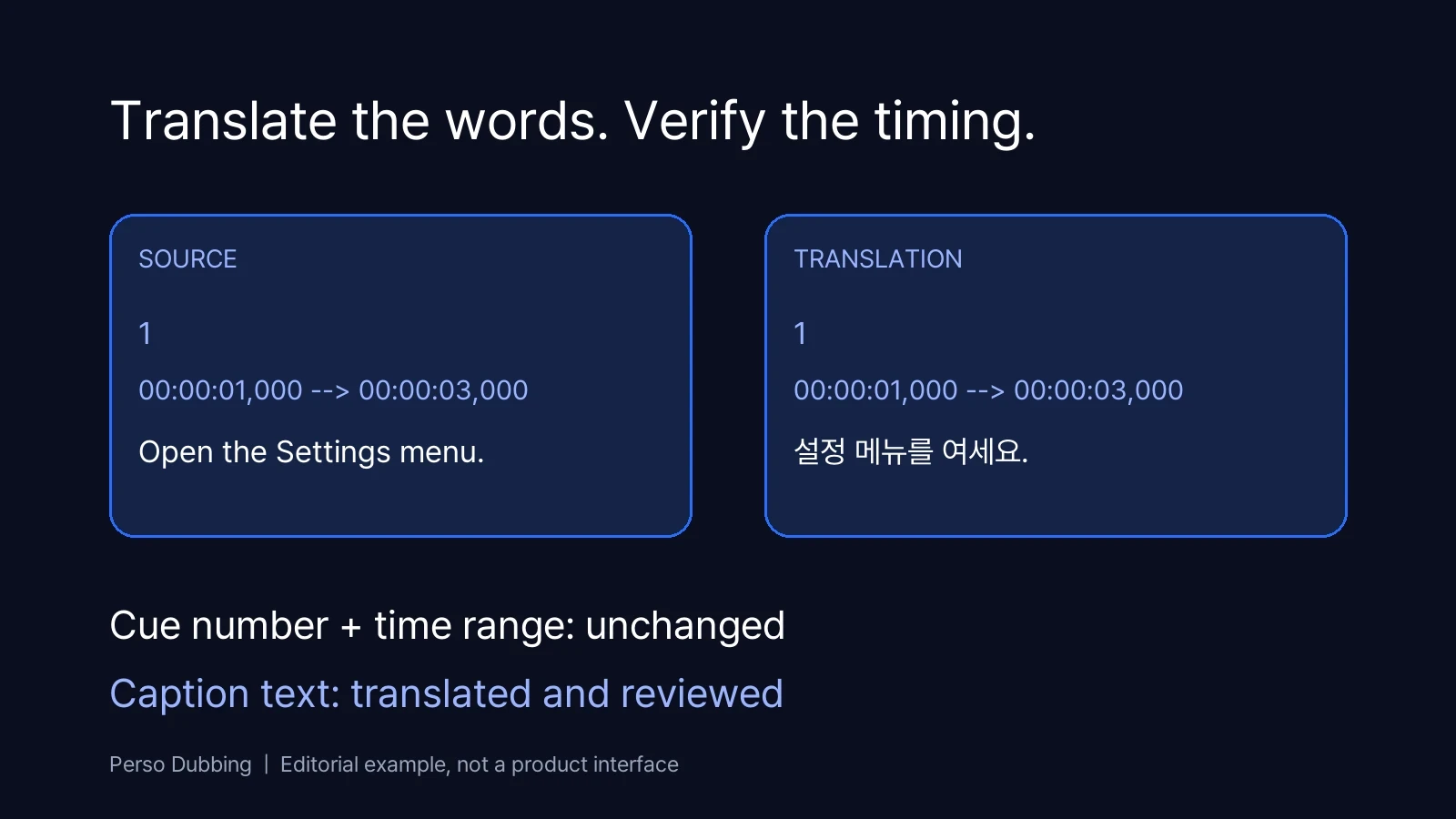
Keep the comma before milliseconds and the --> separator intact. Preserve blank lines between cues. Translate with the surrounding dialogue visible: a sentence may begin in one cue and finish in the next, and word order may change between languages.
Provide a short brief before translating. Identify the target language and audience, the preferred form of address, names that must remain unchanged, and the exact product labels visible on screen. For example, if a button still says “Settings” in the video, decide whether the subtitle should retain that label or explain it in the target language.
A useful instruction for a translator or AI assistant is:
Translate the caption text into Korean for a product tutorial. Preserve every cue number and timestamp exactly. Keep each translated segment attached to its original cue, using adjacent cues for context. Preserve product names and numbers. Return the complete SRT in one code block. After that block, add a separate review note listing any passage that needs a timing or segmentation change. Keep the note out of the SRT file.
An instruction is not a validation step. Compare the returned file with the original before importing it.
3. Compare the source and translated SRT
For a first pass intended to preserve timing, check the following:
Check | Expected result | If it fails |
|---|---|---|
Cue count | Same number of cues | Find a missing, duplicated or merged caption |
Cue numbers and order | Match the source | Restore the correct mapping |
Start and end times | Match each corresponding cue | Review the change before accepting it |
Caption text | Nonempty in every translated cue | Fill omissions and inspect unexpected source-language text |
File encoding | Accepted by the destination | Export with the destination’s required encoding |
To repeat the check manually, open both files side by side. Count the three blocks, compare each number, and compare both timestamps character by character. The expected time ranges are 1.000 to 3.000 seconds, 3.500 to 6.500 seconds, and 7.000 to 10.000 seconds. Make a separate test copy before changing a time or removing a cue.
Our three-cue fixture preserved the IDs and timestamps exactly. Moving the second cue’s start from 00:00:03,500 to 00:00:04,500 failed the timestamp comparison. Removing the final cue failed the cue-count comparison. These checks catch structural changes; they cannot determine whether a translation is correct.
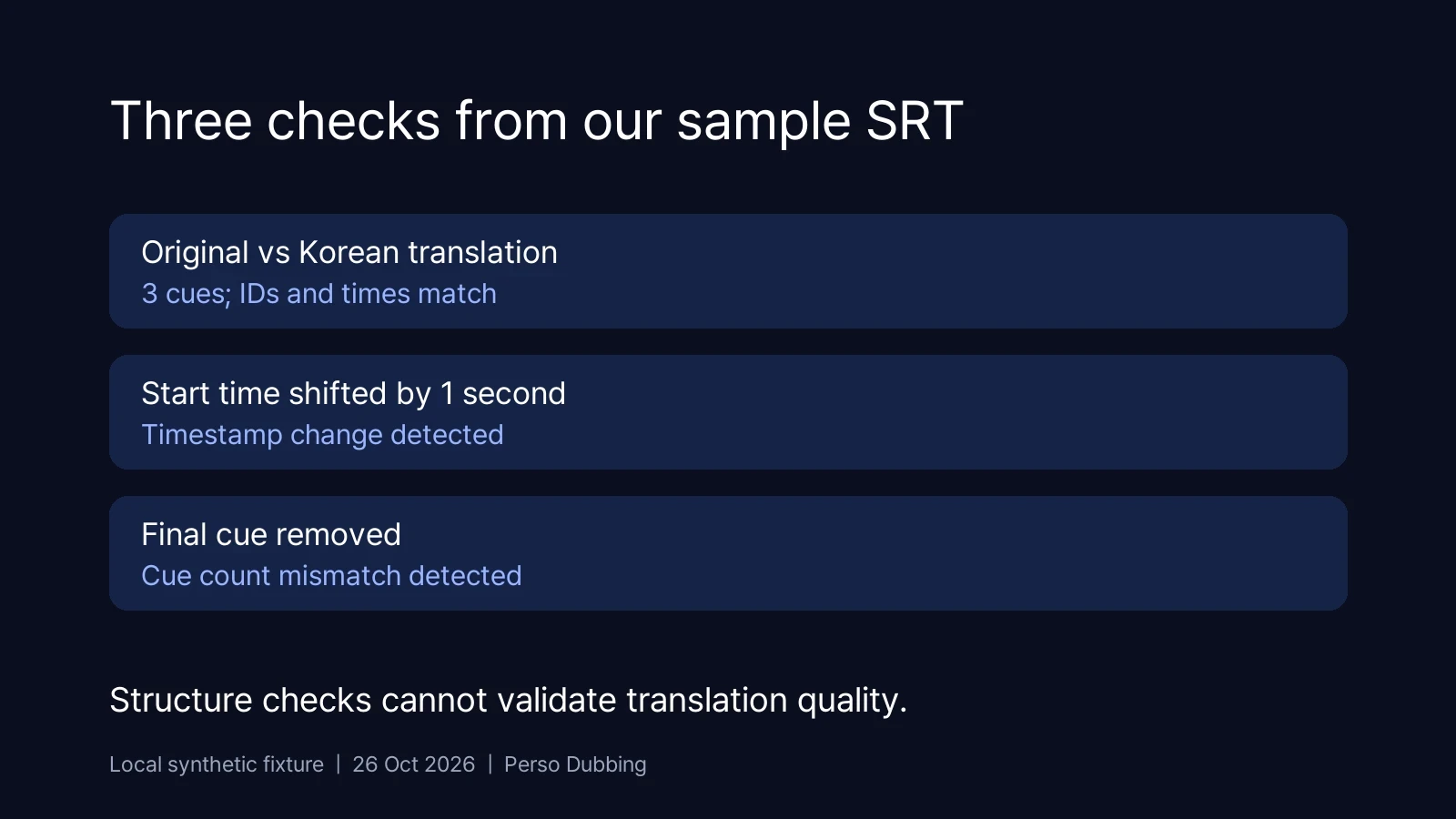
Read brand names, quantities, units and instructions separately. A subtitle can be structurally valid while saying the wrong thing. Have a reviewer who understands the target language compare it with the source dialogue.
For YouTube, the supported caption formats documentation specifies plain UTF-8 for basic SRT files and says SRT styling markup is not recognized. Check other destinations separately rather than assuming they import the same formatting.
4. Review reading time and the actual audio track
The timestamps tell you how long a caption stays on screen. They do not tell you whether a viewer can comfortably read it.
In our example, “Please open the Settings menu before you continue.” contains 50 characters, counting spaces and punctuation. In a two-second cue, that is 25 characters per second. This arithmetic is a review signal, not a universal pass/fail threshold. The appropriate reading speed depends on the language, audience and delivery specification.
When a translation feels rushed, first look for shorter wording that preserves meaning. Break lines at natural phrase boundaries. If that is insufficient, review adjacent cues and speech pauses before adjusting timing or redistributing text. Preserve the original file and record deliberate timing changes so they are distinguishable from accidental corruption.
Play the complete video with the selected subtitle and audio tracks. Check that text is readable on the intended screen size, appears with the relevant speech, and does not obscure essential labels. Pay particular attention to fast dialogue and scene changes.
If the video has a dubbed soundtrack, review against that soundtrack. Original-language timestamps may no longer match the translated speech, even when the video duration is unchanged. Our subtitle sync repair guide covers timing adjustments; the SRT and VTT guide covers delivery-format changes.
5. Deliver the right language file
Export one reviewed SRT per target language. Keep filenames clear enough to distinguish the language and video revision. Upload each file to its corresponding language track and preview the result in the destination player.
Translating an SRT produces translated captions. If viewers need spoken narration in another language, use a separate video dubbing workflow, then check the subtitles against the finished audio. The two deliverables need their own reviews.
For a new video project, start with Perso Dubbing’s video translation options. For an existing subtitle file, keep the source copy, translate the caption text, and compare the timing before delivery.
Frequently asked questions
Q. Can I translate an SRT file without changing its timestamps?
A. Yes. Translate only the caption text and preserve cue numbers and time ranges. Compare the output with the source to catch omissions or timing changes. Then review reading speed and meaning. Some translations need deliberate timing or segmentation adjustments after this initial preservation pass.
Q. Does translating subtitles also translate the video’s voice?
A. No. An SRT contains text and timing information, so translating it changes the captions. Creating a translated voice track requires a dubbing workflow. If you deliver both, review the subtitle timing against the audio track viewers will actually hear.
Q. Why are my translated subtitles hard to read when the timing is unchanged?
A. The translated wording may take longer to read within the same interval. Review phrasing, line breaks and sentence boundaries. Shorten wording without losing meaning, or make controlled timing changes where the audio allows. Identical timestamps alone do not establish subtitle quality.
To translate an SRT file, change its caption text, preserve its cue numbers and timestamps, then review the translation against the final video.
A translated file can pass every timing check and still be difficult to read. Longer wording, a sentence split across captions, or a different dubbed audio track can all require editorial changes. Start by protecting the original timing; make any later timing edits deliberately.
For this guide, we created a three-cue English subtitle file and a Korean translation. A local comparison confirmed that all three cue numbers and time ranges matched. It also detected a deliberately shifted timestamp and a missing cue. This is a reproducible file-integrity exercise, not a test of a translation service’s accuracy.
1. Check what you are starting with
An SRT file contains timed text. Each standard cue has a number, a start and end time, caption text, and a blank line separating it from the next cue. The Library of Congress SRT description documents that structure. An SRT file does not contain the video’s sound or pictures.
Open a copy in a subtitle editor or a plain-text editor. Confirm that the first and last captions match the video version you will deliver. Save the source separately, for example tutorial.en.original.srt, and name the working translation tutorial.ko.srt.
If you have only a video, create and review its source-language subtitles first. Perso Dubbing’s subtitle extraction workflow is a starting point for turning speech into timed text. Check recognition errors before translating: a mistaken product name can otherwise spread into every language.
If you already have an SRT, you can work directly with its text. You do not need to transcribe the video again merely to change the subtitle language.
2. Translate the text while protecting the structure
Here is our complete three-cue source file. Copy only the code block contents into sample-en.srt:
Save this Korean version as sample-ko.srt. Its text changes while all three display intervals remain the same:
Keep the comma before milliseconds and the --> separator intact. Preserve blank lines between cues. Translate with the surrounding dialogue visible: a sentence may begin in one cue and finish in the next, and word order may change between languages.
Provide a short brief before translating. Identify the target language and audience, the preferred form of address, names that must remain unchanged, and the exact product labels visible on screen. For example, if a button still says “Settings” in the video, decide whether the subtitle should retain that label or explain it in the target language.
A useful instruction for a translator or AI assistant is:
Translate the caption text into Korean for a product tutorial. Preserve every cue number and timestamp exactly. Keep each translated segment attached to its original cue, using adjacent cues for context. Preserve product names and numbers. Return the complete SRT in one code block. After that block, add a separate review note listing any passage that needs a timing or segmentation change. Keep the note out of the SRT file.
An instruction is not a validation step. Compare the returned file with the original before importing it.
3. Compare the source and translated SRT
For a first pass intended to preserve timing, check the following:
Check | Expected result | If it fails |
|---|---|---|
Cue count | Same number of cues | Find a missing, duplicated or merged caption |
Cue numbers and order | Match the source | Restore the correct mapping |
Start and end times | Match each corresponding cue | Review the change before accepting it |
Caption text | Nonempty in every translated cue | Fill omissions and inspect unexpected source-language text |
File encoding | Accepted by the destination | Export with the destination’s required encoding |
To repeat the check manually, open both files side by side. Count the three blocks, compare each number, and compare both timestamps character by character. The expected time ranges are 1.000 to 3.000 seconds, 3.500 to 6.500 seconds, and 7.000 to 10.000 seconds. Make a separate test copy before changing a time or removing a cue.
Our three-cue fixture preserved the IDs and timestamps exactly. Moving the second cue’s start from 00:00:03,500 to 00:00:04,500 failed the timestamp comparison. Removing the final cue failed the cue-count comparison. These checks catch structural changes; they cannot determine whether a translation is correct.
Read brand names, quantities, units and instructions separately. A subtitle can be structurally valid while saying the wrong thing. Have a reviewer who understands the target language compare it with the source dialogue.
For YouTube, the supported caption formats documentation specifies plain UTF-8 for basic SRT files and says SRT styling markup is not recognized. Check other destinations separately rather than assuming they import the same formatting.
4. Review reading time and the actual audio track
The timestamps tell you how long a caption stays on screen. They do not tell you whether a viewer can comfortably read it.
In our example, “Please open the Settings menu before you continue.” contains 50 characters, counting spaces and punctuation. In a two-second cue, that is 25 characters per second. This arithmetic is a review signal, not a universal pass/fail threshold. The appropriate reading speed depends on the language, audience and delivery specification.
When a translation feels rushed, first look for shorter wording that preserves meaning. Break lines at natural phrase boundaries. If that is insufficient, review adjacent cues and speech pauses before adjusting timing or redistributing text. Preserve the original file and record deliberate timing changes so they are distinguishable from accidental corruption.
Play the complete video with the selected subtitle and audio tracks. Check that text is readable on the intended screen size, appears with the relevant speech, and does not obscure essential labels. Pay particular attention to fast dialogue and scene changes.
If the video has a dubbed soundtrack, review against that soundtrack. Original-language timestamps may no longer match the translated speech, even when the video duration is unchanged. Our subtitle sync repair guide covers timing adjustments; the SRT and VTT guide covers delivery-format changes.
5. Deliver the right language file
Export one reviewed SRT per target language. Keep filenames clear enough to distinguish the language and video revision. Upload each file to its corresponding language track and preview the result in the destination player.
Translating an SRT produces translated captions. If viewers need spoken narration in another language, use a separate video dubbing workflow, then check the subtitles against the finished audio. The two deliverables need their own reviews.
For a new video project, start with Perso Dubbing’s video translation options. For an existing subtitle file, keep the source copy, translate the caption text, and compare the timing before delivery.
Frequently asked questions
Q. Can I translate an SRT file without changing its timestamps?
A. Yes. Translate only the caption text and preserve cue numbers and time ranges. Compare the output with the source to catch omissions or timing changes. Then review reading speed and meaning. Some translations need deliberate timing or segmentation adjustments after this initial preservation pass.
Q. Does translating subtitles also translate the video’s voice?
A. No. An SRT contains text and timing information, so translating it changes the captions. Creating a translated voice track requires a dubbing workflow. If you deliver both, review the subtitle timing against the audio track viewers will actually hear.
Q. Why are my translated subtitles hard to read when the timing is unchanged?
A. The translated wording may take longer to read within the same interval. Review phrasing, line breaks and sentence boundaries. Shorten wording without losing meaning, or make controlled timing changes where the audio allows. Identical timestamps alone do not establish subtitle quality.
To translate an SRT file, change its caption text, preserve its cue numbers and timestamps, then review the translation against the final video.
A translated file can pass every timing check and still be difficult to read. Longer wording, a sentence split across captions, or a different dubbed audio track can all require editorial changes. Start by protecting the original timing; make any later timing edits deliberately.
For this guide, we created a three-cue English subtitle file and a Korean translation. A local comparison confirmed that all three cue numbers and time ranges matched. It also detected a deliberately shifted timestamp and a missing cue. This is a reproducible file-integrity exercise, not a test of a translation service’s accuracy.
1. Check what you are starting with
An SRT file contains timed text. Each standard cue has a number, a start and end time, caption text, and a blank line separating it from the next cue. The Library of Congress SRT description documents that structure. An SRT file does not contain the video’s sound or pictures.
Open a copy in a subtitle editor or a plain-text editor. Confirm that the first and last captions match the video version you will deliver. Save the source separately, for example tutorial.en.original.srt, and name the working translation tutorial.ko.srt.
If you have only a video, create and review its source-language subtitles first. Perso Dubbing’s subtitle extraction workflow is a starting point for turning speech into timed text. Check recognition errors before translating: a mistaken product name can otherwise spread into every language.
If you already have an SRT, you can work directly with its text. You do not need to transcribe the video again merely to change the subtitle language.
2. Translate the text while protecting the structure
Here is our complete three-cue source file. Copy only the code block contents into sample-en.srt:
Save this Korean version as sample-ko.srt. Its text changes while all three display intervals remain the same:
Keep the comma before milliseconds and the --> separator intact. Preserve blank lines between cues. Translate with the surrounding dialogue visible: a sentence may begin in one cue and finish in the next, and word order may change between languages.
Provide a short brief before translating. Identify the target language and audience, the preferred form of address, names that must remain unchanged, and the exact product labels visible on screen. For example, if a button still says “Settings” in the video, decide whether the subtitle should retain that label or explain it in the target language.
A useful instruction for a translator or AI assistant is:
Translate the caption text into Korean for a product tutorial. Preserve every cue number and timestamp exactly. Keep each translated segment attached to its original cue, using adjacent cues for context. Preserve product names and numbers. Return the complete SRT in one code block. After that block, add a separate review note listing any passage that needs a timing or segmentation change. Keep the note out of the SRT file.
An instruction is not a validation step. Compare the returned file with the original before importing it.
3. Compare the source and translated SRT
For a first pass intended to preserve timing, check the following:
Check | Expected result | If it fails |
|---|---|---|
Cue count | Same number of cues | Find a missing, duplicated or merged caption |
Cue numbers and order | Match the source | Restore the correct mapping |
Start and end times | Match each corresponding cue | Review the change before accepting it |
Caption text | Nonempty in every translated cue | Fill omissions and inspect unexpected source-language text |
File encoding | Accepted by the destination | Export with the destination’s required encoding |
To repeat the check manually, open both files side by side. Count the three blocks, compare each number, and compare both timestamps character by character. The expected time ranges are 1.000 to 3.000 seconds, 3.500 to 6.500 seconds, and 7.000 to 10.000 seconds. Make a separate test copy before changing a time or removing a cue.
Our three-cue fixture preserved the IDs and timestamps exactly. Moving the second cue’s start from 00:00:03,500 to 00:00:04,500 failed the timestamp comparison. Removing the final cue failed the cue-count comparison. These checks catch structural changes; they cannot determine whether a translation is correct.
Read brand names, quantities, units and instructions separately. A subtitle can be structurally valid while saying the wrong thing. Have a reviewer who understands the target language compare it with the source dialogue.
For YouTube, the supported caption formats documentation specifies plain UTF-8 for basic SRT files and says SRT styling markup is not recognized. Check other destinations separately rather than assuming they import the same formatting.
4. Review reading time and the actual audio track
The timestamps tell you how long a caption stays on screen. They do not tell you whether a viewer can comfortably read it.
In our example, “Please open the Settings menu before you continue.” contains 50 characters, counting spaces and punctuation. In a two-second cue, that is 25 characters per second. This arithmetic is a review signal, not a universal pass/fail threshold. The appropriate reading speed depends on the language, audience and delivery specification.
When a translation feels rushed, first look for shorter wording that preserves meaning. Break lines at natural phrase boundaries. If that is insufficient, review adjacent cues and speech pauses before adjusting timing or redistributing text. Preserve the original file and record deliberate timing changes so they are distinguishable from accidental corruption.
Play the complete video with the selected subtitle and audio tracks. Check that text is readable on the intended screen size, appears with the relevant speech, and does not obscure essential labels. Pay particular attention to fast dialogue and scene changes.
If the video has a dubbed soundtrack, review against that soundtrack. Original-language timestamps may no longer match the translated speech, even when the video duration is unchanged. Our subtitle sync repair guide covers timing adjustments; the SRT and VTT guide covers delivery-format changes.
5. Deliver the right language file
Export one reviewed SRT per target language. Keep filenames clear enough to distinguish the language and video revision. Upload each file to its corresponding language track and preview the result in the destination player.
Translating an SRT produces translated captions. If viewers need spoken narration in another language, use a separate video dubbing workflow, then check the subtitles against the finished audio. The two deliverables need their own reviews.
For a new video project, start with Perso Dubbing’s video translation options. For an existing subtitle file, keep the source copy, translate the caption text, and compare the timing before delivery.
Frequently asked questions
Q. Can I translate an SRT file without changing its timestamps?
A. Yes. Translate only the caption text and preserve cue numbers and time ranges. Compare the output with the source to catch omissions or timing changes. Then review reading speed and meaning. Some translations need deliberate timing or segmentation adjustments after this initial preservation pass.
Q. Does translating subtitles also translate the video’s voice?
A. No. An SRT contains text and timing information, so translating it changes the captions. Creating a translated voice track requires a dubbing workflow. If you deliver both, review the subtitle timing against the audio track viewers will actually hear.
Q. Why are my translated subtitles hard to read when the timing is unchanged?
A. The translated wording may take longer to read within the same interval. Review phrasing, line breaks and sentence boundaries. Shorten wording without losing meaning, or make controlled timing changes where the audio allows. Identical timestamps alone do not establish subtitle quality.
To translate an SRT file, change its caption text, preserve its cue numbers and timestamps, then review the translation against the final video.
A translated file can pass every timing check and still be difficult to read. Longer wording, a sentence split across captions, or a different dubbed audio track can all require editorial changes. Start by protecting the original timing; make any later timing edits deliberately.
For this guide, we created a three-cue English subtitle file and a Korean translation. A local comparison confirmed that all three cue numbers and time ranges matched. It also detected a deliberately shifted timestamp and a missing cue. This is a reproducible file-integrity exercise, not a test of a translation service’s accuracy.
1. Check what you are starting with
An SRT file contains timed text. Each standard cue has a number, a start and end time, caption text, and a blank line separating it from the next cue. The Library of Congress SRT description documents that structure. An SRT file does not contain the video’s sound or pictures.
Open a copy in a subtitle editor or a plain-text editor. Confirm that the first and last captions match the video version you will deliver. Save the source separately, for example tutorial.en.original.srt, and name the working translation tutorial.ko.srt.
If you have only a video, create and review its source-language subtitles first. Perso Dubbing’s subtitle extraction workflow is a starting point for turning speech into timed text. Check recognition errors before translating: a mistaken product name can otherwise spread into every language.
If you already have an SRT, you can work directly with its text. You do not need to transcribe the video again merely to change the subtitle language.
2. Translate the text while protecting the structure
Here is our complete three-cue source file. Copy only the code block contents into sample-en.srt:
Save this Korean version as sample-ko.srt. Its text changes while all three display intervals remain the same:
Keep the comma before milliseconds and the --> separator intact. Preserve blank lines between cues. Translate with the surrounding dialogue visible: a sentence may begin in one cue and finish in the next, and word order may change between languages.
Provide a short brief before translating. Identify the target language and audience, the preferred form of address, names that must remain unchanged, and the exact product labels visible on screen. For example, if a button still says “Settings” in the video, decide whether the subtitle should retain that label or explain it in the target language.
A useful instruction for a translator or AI assistant is:
Translate the caption text into Korean for a product tutorial. Preserve every cue number and timestamp exactly. Keep each translated segment attached to its original cue, using adjacent cues for context. Preserve product names and numbers. Return the complete SRT in one code block. After that block, add a separate review note listing any passage that needs a timing or segmentation change. Keep the note out of the SRT file.
An instruction is not a validation step. Compare the returned file with the original before importing it.
3. Compare the source and translated SRT
For a first pass intended to preserve timing, check the following:
Check | Expected result | If it fails |
|---|---|---|
Cue count | Same number of cues | Find a missing, duplicated or merged caption |
Cue numbers and order | Match the source | Restore the correct mapping |
Start and end times | Match each corresponding cue | Review the change before accepting it |
Caption text | Nonempty in every translated cue | Fill omissions and inspect unexpected source-language text |
File encoding | Accepted by the destination | Export with the destination’s required encoding |
To repeat the check manually, open both files side by side. Count the three blocks, compare each number, and compare both timestamps character by character. The expected time ranges are 1.000 to 3.000 seconds, 3.500 to 6.500 seconds, and 7.000 to 10.000 seconds. Make a separate test copy before changing a time or removing a cue.
Our three-cue fixture preserved the IDs and timestamps exactly. Moving the second cue’s start from 00:00:03,500 to 00:00:04,500 failed the timestamp comparison. Removing the final cue failed the cue-count comparison. These checks catch structural changes; they cannot determine whether a translation is correct.
Read brand names, quantities, units and instructions separately. A subtitle can be structurally valid while saying the wrong thing. Have a reviewer who understands the target language compare it with the source dialogue.
For YouTube, the supported caption formats documentation specifies plain UTF-8 for basic SRT files and says SRT styling markup is not recognized. Check other destinations separately rather than assuming they import the same formatting.
4. Review reading time and the actual audio track
The timestamps tell you how long a caption stays on screen. They do not tell you whether a viewer can comfortably read it.
In our example, “Please open the Settings menu before you continue.” contains 50 characters, counting spaces and punctuation. In a two-second cue, that is 25 characters per second. This arithmetic is a review signal, not a universal pass/fail threshold. The appropriate reading speed depends on the language, audience and delivery specification.
When a translation feels rushed, first look for shorter wording that preserves meaning. Break lines at natural phrase boundaries. If that is insufficient, review adjacent cues and speech pauses before adjusting timing or redistributing text. Preserve the original file and record deliberate timing changes so they are distinguishable from accidental corruption.
Play the complete video with the selected subtitle and audio tracks. Check that text is readable on the intended screen size, appears with the relevant speech, and does not obscure essential labels. Pay particular attention to fast dialogue and scene changes.
If the video has a dubbed soundtrack, review against that soundtrack. Original-language timestamps may no longer match the translated speech, even when the video duration is unchanged. Our subtitle sync repair guide covers timing adjustments; the SRT and VTT guide covers delivery-format changes.
5. Deliver the right language file
Export one reviewed SRT per target language. Keep filenames clear enough to distinguish the language and video revision. Upload each file to its corresponding language track and preview the result in the destination player.
Translating an SRT produces translated captions. If viewers need spoken narration in another language, use a separate video dubbing workflow, then check the subtitles against the finished audio. The two deliverables need their own reviews.
For a new video project, start with Perso Dubbing’s video translation options. For an existing subtitle file, keep the source copy, translate the caption text, and compare the timing before delivery.
Frequently asked questions
Q. Can I translate an SRT file without changing its timestamps?
A. Yes. Translate only the caption text and preserve cue numbers and time ranges. Compare the output with the source to catch omissions or timing changes. Then review reading speed and meaning. Some translations need deliberate timing or segmentation adjustments after this initial preservation pass.
Q. Does translating subtitles also translate the video’s voice?
A. No. An SRT contains text and timing information, so translating it changes the captions. Creating a translated voice track requires a dubbing workflow. If you deliver both, review the subtitle timing against the audio track viewers will actually hear.
Q. Why are my translated subtitles hard to read when the timing is unchanged?
A. The translated wording may take longer to read within the same interval. Review phrasing, line breaks and sentence boundaries. Shorten wording without losing meaning, or make controlled timing changes where the audio allows. Identical timestamps alone do not establish subtitle quality.
Continue Reading
Browse All


