What Is an AI Video Translator? A Practical Beginner Guide




Jump to section
Jump to section

Share
Share
Share

AI Video Translator, Localization, and Dubbing Tool
Try it out for Free
An AI video translator converts spoken content into another language, producing translated subtitles, a new voice track, or both, depending on the tool.
For a first project, choose a short clip with clear speech and one target language. Use the result to check meaning, pronunciation, and timing before translating the full video. The example below shows why: an otherwise plausible translation changed "move the launch" into "postpone the launch."
Choose the output your audience needs
Output | What changes | What to check |
|---|---|---|
Translated subtitles | Text appears in the target language while the original speech can remain. | Meaning, reading speed, line breaks, and timing. |
AI dubbing | A generated voice delivers the translated speech. | Meaning, speaker assignment, pronunciation, and the audio mix. |
Dubbing with lip sync | Visible mouth movements are also adjusted to the translated speech. | The dubbed audio plus facial detail and mouth alignment throughout the clip. |
For a screen recording, translated narration and readable subtitles may be enough. A close-up interview gives you another decision: whether adjusting mouth movements is worth the additional processing and review. Lip sync is an optional capability, and availability varies by tool and plan.
How AI video translation works
Many tools combine speech recognition, translation, and speech generation. Their processing order and editing controls vary, but these are the stages a reviewer needs to understand:
Recognize the speech. A transcript captures the spoken words. Speaker labels and timestamps help connect words to the right person and moment. Background noise, overlapping voices, or an unfamiliar name can introduce errors here.
Translate the meaning. The transcript becomes a script in the target language. Check qualifications such as "at least," "up to," and "only if," as well as names, units, and numbers.
Generate and align the voice. For dubbed output, speech synthesis turns the translated script into audio. Voice selection, pacing, and pronunciation affect the result. Voice cloning aims to retain recognizable voice characteristics; it does not guarantee identical expression.
Assemble the output. The translated speech is combined with the video and any retained background audio. Subtitles and optional lip sync add their own checks. Listen for missing sounds, residual original speech, and abrupt changes in volume.
An error in the transcript can carry into the translation and the generated voice. If the final audio says the wrong thing, compare it with the original recording before changing the translated wording.
A real Perso Dubbing example: when "move" became "postpone"
In an October 2026 internal demo, a constructed English workplace script was translated through Perso Dubbing into Portuguese, Spanish, and French. The Portuguese result gives a useful example of what to look for during review.
Version | The instruction |
|---|---|
English source | "If the review takes more than two days, move the launch to Friday." |
Initial Portuguese script | "Se a revisão levar mais de dois dias, adie o lançamento para sexta-feira." |
Edited Portuguese script | "Se a revisão levar mais de dois dias, mude o lançamento para sexta." |
The initial verb, adie, means "postpone." The English source does not say whether Friday is earlier or later than the original launch date. Changing the verb to mude, "move" or "change," removes that added assumption. The revised sentence was regenerated in Perso Dubbing.
Two other details needed to survive: the condition is more than two days, and the destination is Friday. At exactly two days, this instruction does not trigger a move. A reviewer who checks only the number and weekday could miss the change in the action.
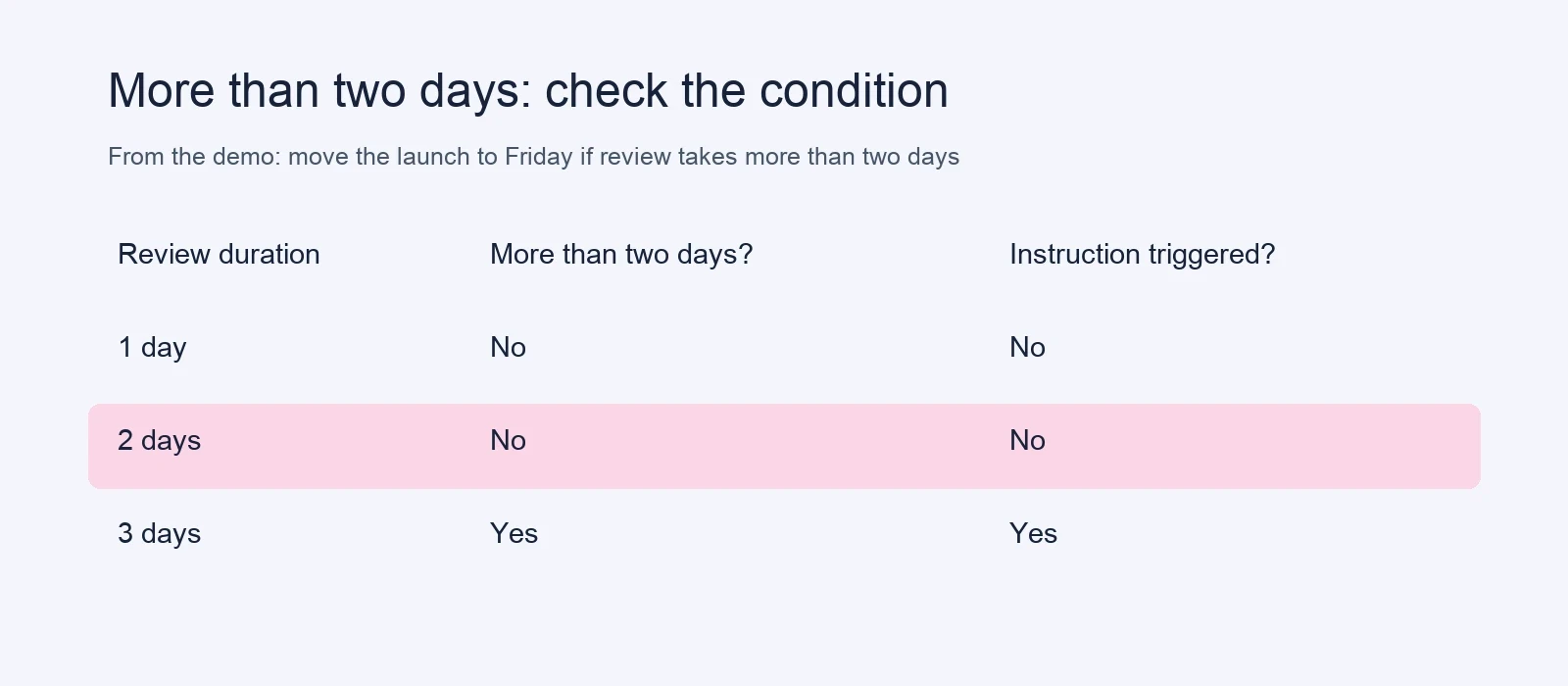
Check the action, the condition, and the destination separately.
The excerpt opens with "We're on the same page, but we're not ready to launch." That first sentence adds another checkpoint: agreement does not imply readiness.
Listen to the selected two-sentence excerpts. The English source was generated with ElevenLabs. The Portuguese speech was generated with Perso Dubbing: its first sentence is automatic output, and its second is the edited, regenerated sentence. These local excerpts include gain adjustment and silence padding, with no speech-speed or pitch change.
English source
Portuguese after editing and regeneration
This is one constructed-script demonstration using actual product outputs, not a customer testimonial or an accuracy benchmark. The selected wording was checked against the source and regenerated audio transcripts. It does not establish pronunciation quality, emotional fidelity, or lip-sync performance.
Use the same check on your own clip
Before generating, write down the details that must survive. In this example, they are: not ready to launch, more than two days, move the launch, and Friday. After generation, compare each detail with the translated script. Correct a mismatch, apply the edit, then replay the updated output. If you cannot judge the target language, give those exact checkpoints to a reviewer who can.
Translate and review your first clip in Perso Dubbing
The Perso Dubbing video translation page includes a sample you can explore before uploading a file. For your own project, start with a short excerpt that includes a real challenge, such as a product name or a change of speaker.
Add your source and choose a language. Open the dubbing workspace and upload a file or use the available URL input. Select the target language and review the available voice and processing options. Editing and regeneration controls vary by dubbing model, so confirm the controls available for your selected model. Check the estimated credits before generating.
Generate a first version. Keep the initial test small enough to review closely. Processing time depends on the file and selected options; allow time for corrections as well as generation.
Review the script against the source. In the project editor, compare the original and translated text with the recording. Check names, numbers, conditions, and speaker assignments. Confirm the current plan features and the editing controls available for your model before choosing a workflow that depends on script changes.
Apply edits and listen again. After making supported text or voice changes, use Apply changes and recheck the resulting audio. A saved text correction is not sufficient evidence that the exported voice says the revised line.
Export and check the actual file. Available downloads can include translated video, audio, subtitles, and scripts, depending on the project and plan. Play the exported file from beginning to end. Check subtitles in the player or channel where the audience will see them.
When adding a language, treat it as a separate version to review. A correction in one language should not be assumed to update the others. If you are working with a voice note rather than a video, see the voice-note translation guide.
Decide whether the result is ready to publish
Check the script for meaning, the audio for delivery, and the video for timing. Those checks answer different questions. A natural-sounding voice can deliver an incorrect number; an accurate sentence can still be rushed or assigned to the wrong speaker.
For each language, have a reviewer who understands both the subject and the target language inspect the full result. Keep any unresolved line out of the release until it is corrected and replayed. For instructions, pay particular attention to conditions and actions that viewers need to follow.
Explore the sample, then test one short clip in Perso Dubbing. Use that clip to confirm the output you need and the review work it requires before committing to a longer video.
Frequently asked questions
Can AI translate a video with multiple speakers?
Tools with multi-speaker support can translate conversations, but you still need to check speaker labels, voice assignments, and interruptions. Overlapping speech can make both transcription and attribution difficult.
Does translating a video always change the speaker's lips?
No. Subtitles and dubbed speech can be produced without changing mouth movements. Lip sync is a separate option; check its availability and allowance for the plan you choose.
Can I publish the first generated version?
Review it first. Compare the meaning with the source, listen to the generated speech, and inspect the exported video and subtitles. The amount of correction depends on the recording, language pair, and content.
An AI video translator converts spoken content into another language, producing translated subtitles, a new voice track, or both, depending on the tool.
For a first project, choose a short clip with clear speech and one target language. Use the result to check meaning, pronunciation, and timing before translating the full video. The example below shows why: an otherwise plausible translation changed "move the launch" into "postpone the launch."
Choose the output your audience needs
Output | What changes | What to check |
|---|---|---|
Translated subtitles | Text appears in the target language while the original speech can remain. | Meaning, reading speed, line breaks, and timing. |
AI dubbing | A generated voice delivers the translated speech. | Meaning, speaker assignment, pronunciation, and the audio mix. |
Dubbing with lip sync | Visible mouth movements are also adjusted to the translated speech. | The dubbed audio plus facial detail and mouth alignment throughout the clip. |
For a screen recording, translated narration and readable subtitles may be enough. A close-up interview gives you another decision: whether adjusting mouth movements is worth the additional processing and review. Lip sync is an optional capability, and availability varies by tool and plan.
How AI video translation works
Many tools combine speech recognition, translation, and speech generation. Their processing order and editing controls vary, but these are the stages a reviewer needs to understand:
Recognize the speech. A transcript captures the spoken words. Speaker labels and timestamps help connect words to the right person and moment. Background noise, overlapping voices, or an unfamiliar name can introduce errors here.
Translate the meaning. The transcript becomes a script in the target language. Check qualifications such as "at least," "up to," and "only if," as well as names, units, and numbers.
Generate and align the voice. For dubbed output, speech synthesis turns the translated script into audio. Voice selection, pacing, and pronunciation affect the result. Voice cloning aims to retain recognizable voice characteristics; it does not guarantee identical expression.
Assemble the output. The translated speech is combined with the video and any retained background audio. Subtitles and optional lip sync add their own checks. Listen for missing sounds, residual original speech, and abrupt changes in volume.
An error in the transcript can carry into the translation and the generated voice. If the final audio says the wrong thing, compare it with the original recording before changing the translated wording.
A real Perso Dubbing example: when "move" became "postpone"
In an October 2026 internal demo, a constructed English workplace script was translated through Perso Dubbing into Portuguese, Spanish, and French. The Portuguese result gives a useful example of what to look for during review.
Version | The instruction |
|---|---|
English source | "If the review takes more than two days, move the launch to Friday." |
Initial Portuguese script | "Se a revisão levar mais de dois dias, adie o lançamento para sexta-feira." |
Edited Portuguese script | "Se a revisão levar mais de dois dias, mude o lançamento para sexta." |
The initial verb, adie, means "postpone." The English source does not say whether Friday is earlier or later than the original launch date. Changing the verb to mude, "move" or "change," removes that added assumption. The revised sentence was regenerated in Perso Dubbing.
Two other details needed to survive: the condition is more than two days, and the destination is Friday. At exactly two days, this instruction does not trigger a move. A reviewer who checks only the number and weekday could miss the change in the action.
Check the action, the condition, and the destination separately.
The excerpt opens with "We're on the same page, but we're not ready to launch." That first sentence adds another checkpoint: agreement does not imply readiness.
Listen to the selected two-sentence excerpts. The English source was generated with ElevenLabs. The Portuguese speech was generated with Perso Dubbing: its first sentence is automatic output, and its second is the edited, regenerated sentence. These local excerpts include gain adjustment and silence padding, with no speech-speed or pitch change.
English source
Portuguese after editing and regeneration
This is one constructed-script demonstration using actual product outputs, not a customer testimonial or an accuracy benchmark. The selected wording was checked against the source and regenerated audio transcripts. It does not establish pronunciation quality, emotional fidelity, or lip-sync performance.
Use the same check on your own clip
Before generating, write down the details that must survive. In this example, they are: not ready to launch, more than two days, move the launch, and Friday. After generation, compare each detail with the translated script. Correct a mismatch, apply the edit, then replay the updated output. If you cannot judge the target language, give those exact checkpoints to a reviewer who can.
Translate and review your first clip in Perso Dubbing
The Perso Dubbing video translation page includes a sample you can explore before uploading a file. For your own project, start with a short excerpt that includes a real challenge, such as a product name or a change of speaker.
Add your source and choose a language. Open the dubbing workspace and upload a file or use the available URL input. Select the target language and review the available voice and processing options. Editing and regeneration controls vary by dubbing model, so confirm the controls available for your selected model. Check the estimated credits before generating.
Generate a first version. Keep the initial test small enough to review closely. Processing time depends on the file and selected options; allow time for corrections as well as generation.
Review the script against the source. In the project editor, compare the original and translated text with the recording. Check names, numbers, conditions, and speaker assignments. Confirm the current plan features and the editing controls available for your model before choosing a workflow that depends on script changes.
Apply edits and listen again. After making supported text or voice changes, use Apply changes and recheck the resulting audio. A saved text correction is not sufficient evidence that the exported voice says the revised line.
Export and check the actual file. Available downloads can include translated video, audio, subtitles, and scripts, depending on the project and plan. Play the exported file from beginning to end. Check subtitles in the player or channel where the audience will see them.
When adding a language, treat it as a separate version to review. A correction in one language should not be assumed to update the others. If you are working with a voice note rather than a video, see the voice-note translation guide.
Decide whether the result is ready to publish
Check the script for meaning, the audio for delivery, and the video for timing. Those checks answer different questions. A natural-sounding voice can deliver an incorrect number; an accurate sentence can still be rushed or assigned to the wrong speaker.
For each language, have a reviewer who understands both the subject and the target language inspect the full result. Keep any unresolved line out of the release until it is corrected and replayed. For instructions, pay particular attention to conditions and actions that viewers need to follow.
Explore the sample, then test one short clip in Perso Dubbing. Use that clip to confirm the output you need and the review work it requires before committing to a longer video.
Frequently asked questions
Can AI translate a video with multiple speakers?
Tools with multi-speaker support can translate conversations, but you still need to check speaker labels, voice assignments, and interruptions. Overlapping speech can make both transcription and attribution difficult.
Does translating a video always change the speaker's lips?
No. Subtitles and dubbed speech can be produced without changing mouth movements. Lip sync is a separate option; check its availability and allowance for the plan you choose.
Can I publish the first generated version?
Review it first. Compare the meaning with the source, listen to the generated speech, and inspect the exported video and subtitles. The amount of correction depends on the recording, language pair, and content.
An AI video translator converts spoken content into another language, producing translated subtitles, a new voice track, or both, depending on the tool.
For a first project, choose a short clip with clear speech and one target language. Use the result to check meaning, pronunciation, and timing before translating the full video. The example below shows why: an otherwise plausible translation changed "move the launch" into "postpone the launch."
Choose the output your audience needs
Output | What changes | What to check |
|---|---|---|
Translated subtitles | Text appears in the target language while the original speech can remain. | Meaning, reading speed, line breaks, and timing. |
AI dubbing | A generated voice delivers the translated speech. | Meaning, speaker assignment, pronunciation, and the audio mix. |
Dubbing with lip sync | Visible mouth movements are also adjusted to the translated speech. | The dubbed audio plus facial detail and mouth alignment throughout the clip. |
For a screen recording, translated narration and readable subtitles may be enough. A close-up interview gives you another decision: whether adjusting mouth movements is worth the additional processing and review. Lip sync is an optional capability, and availability varies by tool and plan.
How AI video translation works
Many tools combine speech recognition, translation, and speech generation. Their processing order and editing controls vary, but these are the stages a reviewer needs to understand:
Recognize the speech. A transcript captures the spoken words. Speaker labels and timestamps help connect words to the right person and moment. Background noise, overlapping voices, or an unfamiliar name can introduce errors here.
Translate the meaning. The transcript becomes a script in the target language. Check qualifications such as "at least," "up to," and "only if," as well as names, units, and numbers.
Generate and align the voice. For dubbed output, speech synthesis turns the translated script into audio. Voice selection, pacing, and pronunciation affect the result. Voice cloning aims to retain recognizable voice characteristics; it does not guarantee identical expression.
Assemble the output. The translated speech is combined with the video and any retained background audio. Subtitles and optional lip sync add their own checks. Listen for missing sounds, residual original speech, and abrupt changes in volume.
An error in the transcript can carry into the translation and the generated voice. If the final audio says the wrong thing, compare it with the original recording before changing the translated wording.
A real Perso Dubbing example: when "move" became "postpone"
In an October 2026 internal demo, a constructed English workplace script was translated through Perso Dubbing into Portuguese, Spanish, and French. The Portuguese result gives a useful example of what to look for during review.
Version | The instruction |
|---|---|
English source | "If the review takes more than two days, move the launch to Friday." |
Initial Portuguese script | "Se a revisão levar mais de dois dias, adie o lançamento para sexta-feira." |
Edited Portuguese script | "Se a revisão levar mais de dois dias, mude o lançamento para sexta." |
The initial verb, adie, means "postpone." The English source does not say whether Friday is earlier or later than the original launch date. Changing the verb to mude, "move" or "change," removes that added assumption. The revised sentence was regenerated in Perso Dubbing.
Two other details needed to survive: the condition is more than two days, and the destination is Friday. At exactly two days, this instruction does not trigger a move. A reviewer who checks only the number and weekday could miss the change in the action.
Check the action, the condition, and the destination separately.
The excerpt opens with "We're on the same page, but we're not ready to launch." That first sentence adds another checkpoint: agreement does not imply readiness.
Listen to the selected two-sentence excerpts. The English source was generated with ElevenLabs. The Portuguese speech was generated with Perso Dubbing: its first sentence is automatic output, and its second is the edited, regenerated sentence. These local excerpts include gain adjustment and silence padding, with no speech-speed or pitch change.
English source
Portuguese after editing and regeneration
This is one constructed-script demonstration using actual product outputs, not a customer testimonial or an accuracy benchmark. The selected wording was checked against the source and regenerated audio transcripts. It does not establish pronunciation quality, emotional fidelity, or lip-sync performance.
Use the same check on your own clip
Before generating, write down the details that must survive. In this example, they are: not ready to launch, more than two days, move the launch, and Friday. After generation, compare each detail with the translated script. Correct a mismatch, apply the edit, then replay the updated output. If you cannot judge the target language, give those exact checkpoints to a reviewer who can.
Translate and review your first clip in Perso Dubbing
The Perso Dubbing video translation page includes a sample you can explore before uploading a file. For your own project, start with a short excerpt that includes a real challenge, such as a product name or a change of speaker.
Add your source and choose a language. Open the dubbing workspace and upload a file or use the available URL input. Select the target language and review the available voice and processing options. Editing and regeneration controls vary by dubbing model, so confirm the controls available for your selected model. Check the estimated credits before generating.
Generate a first version. Keep the initial test small enough to review closely. Processing time depends on the file and selected options; allow time for corrections as well as generation.
Review the script against the source. In the project editor, compare the original and translated text with the recording. Check names, numbers, conditions, and speaker assignments. Confirm the current plan features and the editing controls available for your model before choosing a workflow that depends on script changes.
Apply edits and listen again. After making supported text or voice changes, use Apply changes and recheck the resulting audio. A saved text correction is not sufficient evidence that the exported voice says the revised line.
Export and check the actual file. Available downloads can include translated video, audio, subtitles, and scripts, depending on the project and plan. Play the exported file from beginning to end. Check subtitles in the player or channel where the audience will see them.
When adding a language, treat it as a separate version to review. A correction in one language should not be assumed to update the others. If you are working with a voice note rather than a video, see the voice-note translation guide.
Decide whether the result is ready to publish
Check the script for meaning, the audio for delivery, and the video for timing. Those checks answer different questions. A natural-sounding voice can deliver an incorrect number; an accurate sentence can still be rushed or assigned to the wrong speaker.
For each language, have a reviewer who understands both the subject and the target language inspect the full result. Keep any unresolved line out of the release until it is corrected and replayed. For instructions, pay particular attention to conditions and actions that viewers need to follow.
Explore the sample, then test one short clip in Perso Dubbing. Use that clip to confirm the output you need and the review work it requires before committing to a longer video.
Frequently asked questions
Can AI translate a video with multiple speakers?
Tools with multi-speaker support can translate conversations, but you still need to check speaker labels, voice assignments, and interruptions. Overlapping speech can make both transcription and attribution difficult.
Does translating a video always change the speaker's lips?
No. Subtitles and dubbed speech can be produced without changing mouth movements. Lip sync is a separate option; check its availability and allowance for the plan you choose.
Can I publish the first generated version?
Review it first. Compare the meaning with the source, listen to the generated speech, and inspect the exported video and subtitles. The amount of correction depends on the recording, language pair, and content.
Continue Reading
Browse All